To check if your website is down, open it on your phone with Wi-Fi turned off, then paste the address into a free "is it down" checker. If both fail, it's down for everyone. For a small business site, the cause is usually something that lapsed: the domain, the hosting bill, the DNS settings or the security certificate. Each one leaves a different sign, and you can tell which in about ten minutes.
Step 1: Is it down for everyone, or just you?
Before you call anyone, rule out your own computer and network. It takes two minutes.
- Turn off Wi-Fi on your phone and open your site over cellular data. Type the address yourself rather than using a saved link.
- Paste your address into a free website down checker. Search "is it down" and pick any of the tools at the top. They load your site from their own servers.
- If the site works on your phone and in the checker, the problem is on your side: the office network, the router, a browser extension or old saved data. Restart the router and try another browser.
- If it fails everywhere, write down the exact words on the screen, and any code in small type. You'll need them for step 2.
- Tap the Website button on your Google Business Profile too. That's the link most customers use, and it may point to an older address.
Step 2: Read the error, then match it to a cause
The message your browser shows is the best clue you have. The codes below are Chrome's. Other browsers use different words for the same problems.
| What you see | What it usually means | Most likely cause |
|---|---|---|
| "This site can't be reached" with ERR_NAME_NOT_RESOLVED or DNS_PROBE_FINISHED_NXDOMAIN | The web address doesn't point anywhere, or now points somewhere else | Expired domain or broken DNS |
| A page saying the domain has expired, or a page full of ads or "this domain may be for sale" | The registrar has taken the address back from your site | Expired domain |
| ERR_CONNECTION_TIMED_OUT or ERR_CONNECTION_REFUSED | The address works, but the server behind it doesn't answer or won't let the browser in | Hosting outage, unpaid or cancelled hosting |
| "Account suspended" or a hosting company's default page | The host turned the site off or it was never set up on this server | Unpaid hosting, or the site was moved |
| 500, 502, 503 or 504 error | The server is reachable but failing to build the page | Hosting problem, broken plugin or update |
| "Your connection is not private" with NET::ERR_CERT_DATE_INVALID | The security certificate expired, or the device's clock is wrong | Expired SSL certificate |
| A red full-page warning that the site is dangerous or deceptive | Google found a security problem and warns visitors before they reach the site | Hacked site |
Step 3: The checklist by cause, in order
Go through these in order. The first ones are the most common for small business sites and the fastest to confirm. Several also cause the one after them. An expired domain takes the email and the certificate down with it, for example.
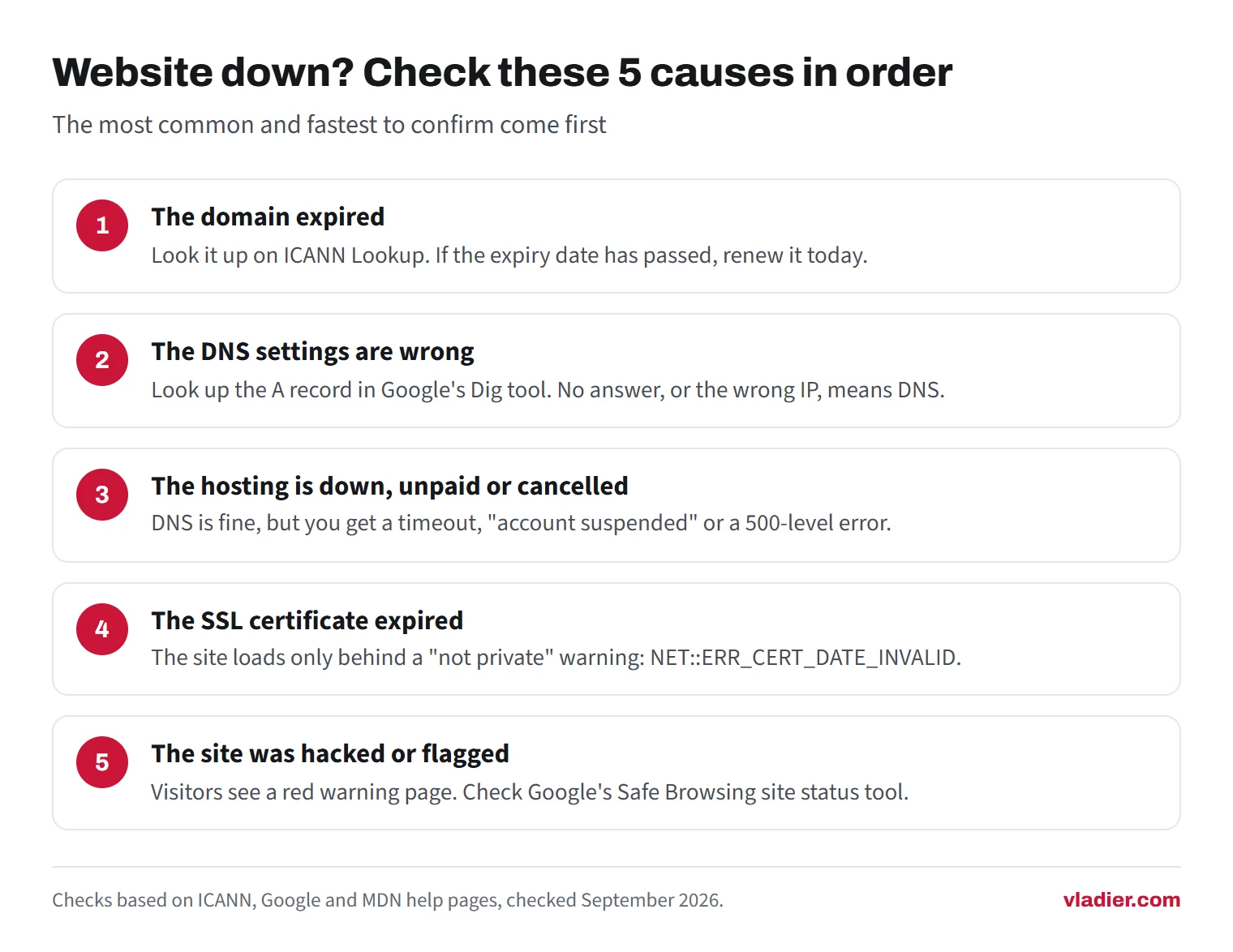
1. The domain expired
How to tell. Look your domain up on ICANN Lookup, the free registration search run by the body that oversees domain names. It shows the expiry date and the registrar, the company you pay for the domain. If the date has passed, you've found the problem. You may also see a page that says the domain expired. A registrar that shows any page after expiry has to say so and explain how to renew.
Registrars have to send you renewal reminders about a month and a week before expiry, and at least one more within five days after. Check the spam folder of whatever email address the domain was registered with, which may be an old one. After expiry, the registrar can cut the link between your domain and your site, and your email on that domain stops working too. You can still renew during that period. For .com and other generic endings, if the domain is deleted, the registry keeps it in a 30-day Redemption Grace Period, during which it can still be restored.
What to do. Log in to the registrar and renew today. Ask what restoring costs if it's already past the renewal stage. Then turn on auto-renew and put a card on the account that won't expire soon. The registrar has to restore your settings once you renew, but give it a few hours before you panic.
If you can't log in because a former web designer registered the domain in their name, fix that ownership first. Our guide to subscription vs. buying a website covers why the domain should always be in your business's name.
2. The DNS settings are wrong
DNS is the address book that tells browsers which server your domain lives on. The domain can be paid up and the site still unreachable if those records were changed, deleted or never updated after a move.
How to tell. Open Google's free Dig tool in the Admin Toolbox, type your domain and look up the A record. No answer means the domain has no working DNS. An answer that doesn't match your host's IP address, which your hosting panel shows, means the domain points to the wrong place. Also check the www version separately. One can work while the other doesn't.
The usual story: someone switched the domain's nameservers while setting up email or a new builder. A hosting move didn't bring the records along. A former provider's DNS service was cancelled.
What to do. Put the A record, or the records your builder gives you, back to what your current host says. Changes can take a while to show everywhere, so check again with Dig rather than your own browser.
3. The hosting is down, unpaid or cancelled
How to tell. DNS answers correctly, but the browser times out, the connection is refused, or you get an "account suspended" page. A 500-level error means the server was reached but couldn't produce the page. A 503 is often used for maintenance or overload.
What to do, in order. Check the host's status page and your email for an outage notice. Log in to the billing page and look for a failed payment. Rule that out first on a small site, because cards on file expire and renewal emails go unread. If the account is paid and the host reports no outage, a 500 error after an update usually means a plugin or theme broke. Ask the host's support to check the error log.
As for Google, a short outage mostly slows its crawlers down, since they back off when they see server errors. URLs that keep returning those errors get dropped from Google's index. A site that stays down needs fixing now, not after the busy season. Our hosting cost guide covers what reliable hosting should cost.
4. The SSL certificate expired
How to tell. The site loads, but only behind a full-page "not private" warning. Chrome shows NET::ERR_CERT_DATE_INVALID. Check on a second device first: the same warning appears when the device's own clock is wrong.
Many free certificates last 90 days, with renewal recommended every 60. Renewal is automatic on most hosts, and it quietly stops working after a hosting move, a DNS change or an expired domain.
What to do. Renew or reissue the certificate in your hosting panel or builder. Then confirm the new expiry date. The full walkthrough is in our guide to the Not Secure warning.
5. The site was hacked or flagged as unsafe
How to tell. Visitors see a red warning page instead of your site, or your listing in Google carries a warning. Paste your address into Google's Safe Browsing site status tool. If your site is verified in Search Console, open the Security Issues report. It lists hacked content, malware and deceptive pages Google found.
What to do. Get the site cleaned first. That's a job for your host or whoever built the site, and it includes changing every password. Then request a review in the Security Issues report and explain what was wrong and what you fixed. Google says most reviews take several days or weeks, and sending another request before you hear back can slow things down. For malware warnings, Google's Transparency Report help says a cleaned site is typically removed from the unsafe list within 24 hours of a clean scan.
If the site isn't in Search Console yet, add it now. Google can only send you security alerts for sites you've verified.
How often listed business websites don't work
In our research on 1,000 trade business websites (September 2026), we loaded the homepage listed for each business in public map data. Of the 898 we could check, 18.3% did not work at all. For 12.4%, the domain no longer resolved, which usually means it wasn't renewed or its DNS is broken. Most of the rest returned an error page or didn't respond. Another 1.7% showed a parked or for-sale page. Together, about 1 in 5 listed addresses led nowhere useful.
Results varied by trade. In our sample, close to a third of the listed sites for cleaning and painting businesses didn't work, against around 1 in 10 for HVAC. Those per-trade samples are small, so read them as a hint, not a ranking.
The limits: we checked each homepage once, without running JavaScript, and the address listed for a business can be years out of date. That's still the link a customer taps. Full numbers are in our State of American Trades Websites report.
How to keep it from happening again
Most of the causes above come down to a renewal someone missed or a change nobody checked. A few habits cover most of it.
- Turn on auto-renew for the domain, and renew for several years if your registrar allows it.
- Keep a card on the registrar and hosting accounts that won't expire this year, and update both when you get a new card.
- Make sure the domain is registered to your business, with an email address you check.
- Set a free uptime monitor to email you when the homepage stops loading. Many down checkers offer one.
- Once a month, open your site from your Google Business Profile link on your phone.
If someone else runs the site, ask them who pays the domain, when it expires and who gets the alerts. On our plans, hosting is part of the monthly price and the domain and site belong to you. Whoever runs your site, check your own domain on ICANN Lookup today and note the expiry date.
Frequently asked questions
How do I know if a website is down for everyone or just me?
My domain expired. Can I get it back?
Will my website being down hurt my Google ranking?
Why does my site work on my computer but not on my phone?
What does a 503 error mean?
Sources we checked (11)
- ICANN: Expired Registration Recovery Policy (ERRP)
- ICANN: Domain Name Renewal and Expiration FAQs
- ICANN Lookup: domain registration data search
- Google Chrome Help: Get help with common error messages in Chrome
- Google Admin Toolbox: Dig (DNS lookup)
- Google Search Central: How HTTP status codes, and network and DNS errors affect Google Search
- Search Console Help: Security Issues report
- Google Transparency Report: Safe Browsing site status
- MDN Web Docs: HTTP response status codes
- Let's Encrypt: Frequently Asked Questions (certificate lifetime)
- Transparency Report Help Center: Safe Browsing FAQs
Want to see a new site before you decide anything?
We'll build your website for free and send you a private link. If you like it, plans start at $99/month. If not, you owe nothing.
Build my free website