A "Not Secure" label in your address bar means one of three things. Your site has no SSL certificate at all. Or it has one that expired or carries the wrong name. Or the page still loads part of itself the old insecure way. The fix is almost never a purchase: an SSL certificate for a website like yours is free, and most hosting panels and builders already include one. The work is telling the three apart.
What the warning means, and why it gets louder in October 2026
Your site reaches a visitor's browser one of two ways. Plain HTTP sends the page as readable text anyone on that network can read or change on the way. HTTPS encrypts the trip, using a certificate that also proves the site at your address is yours.
When a page arrives over HTTP, Chrome puts an icon and the words "Not secure" next to your address. Click it and Chrome tells the visitor the site doesn't use a private connection, and that someone may be able to view and change what they send through it.
Most people scroll past that label today. Chrome is about to make it harder to ignore. Google says the "Always Use Secure Connections" setting turns on by default in Chrome 147, due April 2026, for the billion-plus people on Enhanced Safe Browsing. In Chrome 154, due October 2026, it turns on for everyone. After that, a first visit to a public HTTP site gets a warning screen before your content loads, and the visitor has to choose to continue.
Google expects that screen to be rare, since HTTPS already covers 97% to 99% of page loads depending on the operating system. Being one of the rare ones is the problem. A homeowner who has never seen a warning screen before won't click past one to reach your quote form.
Check your own site in 2 minutes
Do this on a computer, in Chrome, on your real domain. You're looking for which symptom you have, not for a score.
- Type your domain with nothing in front of it, press Enter, and look at the left end of the address bar.
- Click whatever icon is there. Chrome says in plain words what it thinks of the connection.
- Now type http:// in front of your address and press Enter. The address bar should flip to https:// by itself. If it stays on http://, your redirect is missing.
- If a full-page warning appears instead, write down the code in the small type. NET::ERR_CERT_DATE_INVALID, ERR_CERT_COMMON_NAME_INVALID and NET::ERR_CERT_AUTHORITY_INVALID are three different problems.
- Press F12, click Console, then reload. Mixed content warnings name the files still loading over HTTP.
- Paste your domain into the free SSL Server Test at ssllabs.com to see the expiry date and which names the certificate covers. Aim for a grade of A or A+.
- Tap the Website button on your Google Business Profile. That link sends people wherever it was pointed years ago.
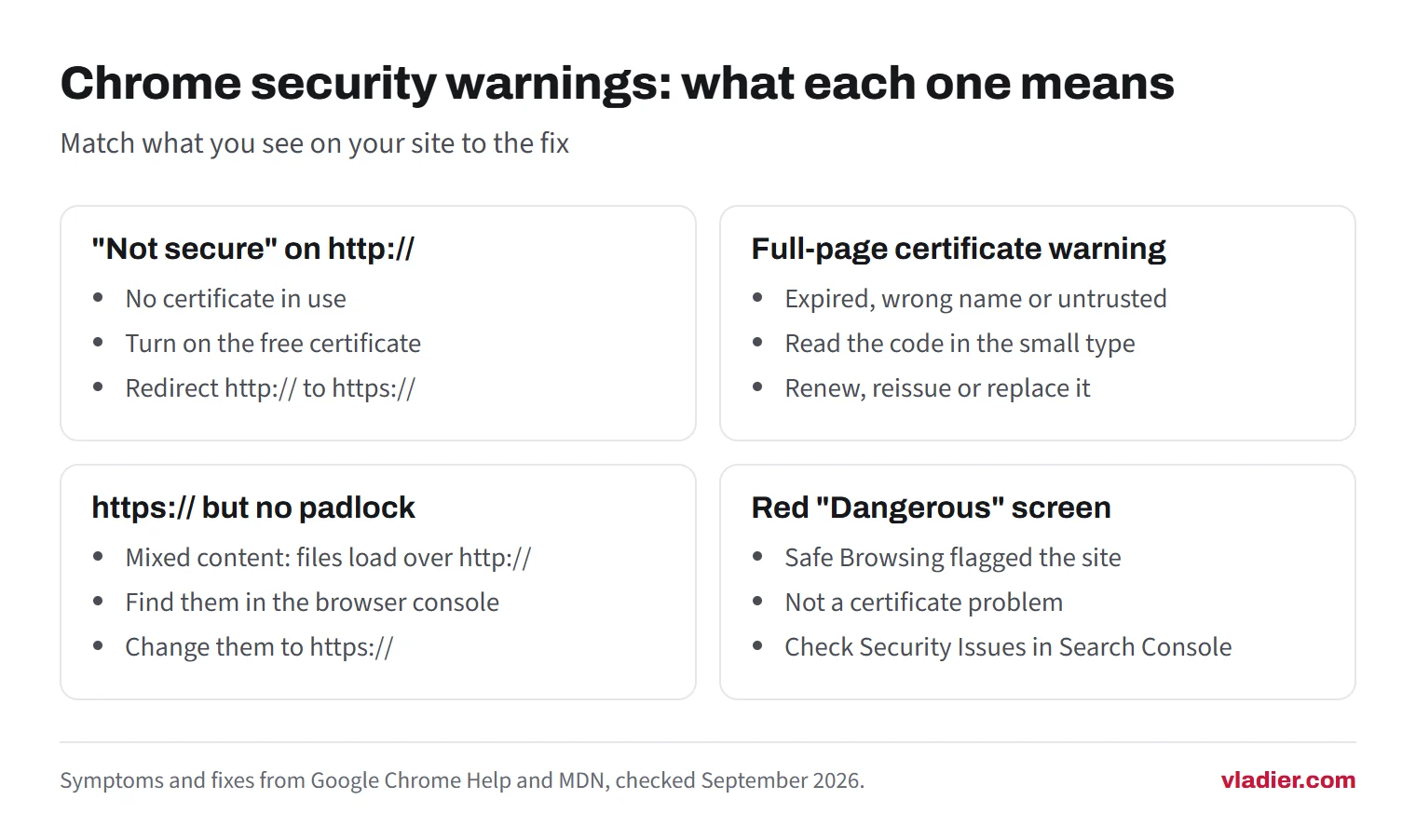
Write down what you saw. The table below matches each symptom to a fix.
What you see, what it means, what to do
The wording below is Chrome's. Safari and Firefox say much the same thing in their own words.
| What you see | What it means | What to do |
|---|---|---|
| "Not secure" next to an http:// address | No certificate is in use on this address | Turn on the free certificate at your host or builder, then redirect http:// to https:// |
| Full-page warning, NET::ERR_CERT_DATE_INVALID | The certificate expired, or the visitor's own clock is wrong | Check the expiry date, renew, then confirm automatic renewal runs |
| ERR_CERT_COMMON_NAME_INVALID | The certificate is for a different name, often yourdomain.com but not www.yourdomain.com | Reissue it covering both names, or redirect one name to the other |
| NET::ERR_CERT_AUTHORITY_INVALID | The certificate wasn't issued by an authority browsers trust, or it's self-signed | Replace it with one from a public authority. Let's Encrypt issues them at no charge |
| https:// in the address, but no padlock | Mixed content: part of the page still loads over http:// | Find those files in the browser console and change them to https:// |
| A red full-page "Dangerous" screen | Safe Browsing flagged the site as unsafe. This is not a certificate problem | Open the Security Issues report in Search Console and deal with what's flagged |
An SSL certificate for a website is free, and paid ones rarely add anything
Most advice on this starts with "buy an SSL certificate". For a small service business that's the wrong first step.
Let's Encrypt is a nonprofit certificate authority, and it says plainly that it doesn't charge a fee for its certificates. They last 90 days, with renewal recommended every 60. That sounds like a chore you'd forget, but it isn't yours to remember: for most people the hosting provider gets and manages the certificates for them. It belongs on the same short list as backups and updates in website maintenance. Squarespace names Let's Encrypt as its certificate partner and refreshes every 90 days.
Above the basic certificate sit two paid tiers, organization validation and extended validation. Let's Encrypt issues domain validation certificates only, and says it doesn't offer the other two because it can't automate them. Extended validation used to put your company name in the address bar. Chrome moved that name behind the padlock in Chrome 77, back in 2019, after its own research found the badge wasn't protecting users as intended. Firefox followed. Customers see the same padlock either way.
The paid tiers add a warranty, a support line and a check on your business identity. None of that changes what a homeowner sees before they call. If you already pay for hosting or a builder plan, a certificate is almost certainly in that bill, so a separate yearly SSL charge is worth questioning. Our hosting cost guide covers what's worth paying for instead.
Turning on your free SSL certificate, by where your site lives
Find the one that matches your setup. Each needs a login. If you don't have it, getting it back is the real first job.
- Hosting control panel. In cPanel, open SSL/TLS Status. AutoSSL secures domains with domain-validated certificates on its own, and that screen shows which domains it covers and which are excluded. Check that your domain and its www version are both included, then run it. Plesk and most hosts' dashboards have the same thing under another name.
- Website builder. The certificate comes with the plan and mostly handles itself. Squarespace gives free certificates to its own domains, connected third-party domains and subdomains. Its SSL panel has a "Secure (Preferred)" setting that redirects visitors to HTTPS, and a change there can take up to 48 hours. Wix includes a certificate at no extra cost on every site and doesn't let you turn it off. When a builder site shows Not Secure, the usual cause is a custom domain whose DNS records changed recently.
- WordPress on your own hosting. Get the certificate working at the host first. Then in the admin go to Settings, then General, and change both "WordPress Address (URL)" and "Site Address (URL)" from http:// to https://. Save, and you'll be logged back in over the secure address.
- A site whoever built it won't answer about. Check who controls the domain registrar account. If it's in your business's name you can move the site to a host that issues certificates automatically. If it isn't, sort that out first.
Once the certificate is live, send every HTTP visit to the HTTPS version with a 301 redirect. That status code tells search engines the HTTPS address is the canonical one. Hosts and builders usually have a checkbox for it. Then run the 2-minute check again.
When it worked yesterday: expired certificates
Certificates are good for a set number of days, and when the clock runs out the browser stops trusting yours. This is the version that hits a site that was fine last week.
An expired certificate is worse for you than never having one. No certificate gets a gray label most people ignore. An expired one gets your customer a full-page warning saying the connection is not private.
The reasons are dull. Renewal was manual and nobody did it. Renewal was automatic and quietly broke after the site moved servers. The card on the hosting account expired, or a yearly certificate lapsed with the invoice in a spam folder.
Renew it, then prove the automation works. Let's Encrypt recommends renewing 90-day certificates every 60 days, which leaves about a month of margin if an attempt fails. Set a calendar reminder three weeks out and check the expiry date with the SSL test. If the date moved on its own, you can stop watching.
Rule out one thing first. If the warning mentions your clock being behind or ahead, the date on that device may be the problem rather than your site. Check on a second device before you call anyone.
Mixed content: the padlock that disappears after you switch
You turn the certificate on, the address shows https://, and the padlock still isn't right. Usually that's mixed content: a page loaded securely that then pulls in a file over plain HTTP.
Browsers treat the two kinds differently. Images, audio and video requested over http:// get upgraded to https:// automatically. Scripts, stylesheets, fonts and iframes get blocked outright. That's why a site can look almost fine after a switch and still lose its map, its gallery or half its layout.
To find them, open the page, press F12, click Console and reload. The browser lists what it upgraded and what it blocked, file by file.
Most of what turns up is old content of your own: image links pasted in years ago, an embedded map, a font. Change http:// to https:// in each, or make them relative, so /photos/roof.jpg instead of the full address. On a WordPress site with hundreds of old posts, a search and replace across the database beats editing by hand. If an outside file has no HTTPS version at all, stop using it. The browser blocks it anyway.
How common this is, and what it costs to fix
In our research on 1,000 trade business websites (September 2026), of the 719 sites that loaded normally, 35 (4.9%) had no HTTPS at all. Those are the ones browsers mark Not Secure today and will put a warning screen in front of from October 2026.
That's a small share, and the easy half of the problem. The bigger number from the same sample: about 1 in 5 of the listed website addresses we could check led nowhere useful. Some domains no longer resolved, some returned an error page, some showed a parked or for-sale page.
The research has limits worth stating. We checked homepages only, we didn't run JavaScript, and the address listed for a business can be years out of date. That last one is still a problem, because it's the link a customer taps. Full numbers are in our State of American Trades Websites report.
On cost: the certificate is $0. If your panel has AutoSSL or you're on a builder, the only cost is ten minutes finding the button. Paying someone runs about an hour of work on a normal small site. Longer on a WordPress site with years of hardcoded http:// image links, where the cleanup is the job and the certificate is the easy bit.
Run the 2-minute check on your domain today, and on the link in your Google Business Profile while you're there. If both come back clean, open the site on your phone next, because that's the check customers actually make.
Frequently asked questions
Do I have to buy an SSL certificate for my website?
Does HTTPS help my Google ranking?
My address says https:// but there's no padlock. What's wrong?
How long does it take to fix a Not Secure warning?
Sources we checked (14)
- Google: HTTPS by default (Always Use Secure Connections, Chrome 147 and Chrome 154)
- Google Chrome Help: Check if a site's connection is secure
- Google Chrome Help: Get help with common error messages in Chrome
- Let's Encrypt: Frequently Asked Questions (cost, 90-day certificates, DV only)
- Let's Encrypt: Getting Started
- Chromium security-dev: Upcoming Change to Chrome's Identity Indicators (EV moved out of the URL bar, Chrome 77)
- MDN Web Docs: Mixed content
- web.dev: Enable HTTPS on your servers
- Google Search Central: Understanding page experience in Google Search results
- cPanel Documentation: SSL/TLS Status and AutoSSL
- Squarespace Help Center: Squarespace SSL certificates (checked September 2026)
- Wix Help Center: About SSL and HTTPS (checked September 2026)
- WordPress Documentation: Settings General screen
- Qualys SSL Labs: SSL Server Test
Want to see a new site before you decide anything?
We'll build your website for free and send you a private link. If you like it, plans start at $99/month. If not, you owe nothing.
Build my free website