Google Ads pays for a contractor when the profit on one job is bigger than the cost of finding that job. To get that cost, multiply three things: the price of a click, the clicks it takes to get a call, and the calls it takes to book one job. Most pages about advertising for contractors come from agencies that manage ads, so they start with how many people search. This one starts with the division. We build websites and don't sell or manage ads, so we have no stake in whether you run them.
How many people search for each trade
We pulled U.S. search volumes from Google Keyword Planner on September 17, 2026, for four searches a homeowner types when something breaks:
| Search | Average monthly U.S. searches |
|---|---|
| plumber near me | 823,000 |
| electrician near me | 368,000 |
| hvac repair | 74,000 |
| roof repair | 74,000 |
Every trade has plenty of searches. What decides the outcome is whether you can buy some of them for less than a job is worth to you, and that depends on three numbers. Google sets only one of them.
The break-even calculator, step by step
You need four inputs. Two come from public benchmarks until you have your own data. Two only you know.
- Cost per click. What Google charges each time someone clicks your ad. We use LocaliQ's 2025 home services report, which looked at 3,211 U.S. search campaigns that ran from April 1, 2024, to March 21, 2025. Its averages are medians.
- Clicks needed per lead. Divide 1 by the conversion rate. A 7.63% conversion rate means about 13 clicks for each call or form.
- Leads needed per booked job. How many callers it takes to book one job. Nobody publishes this for your town. Count it yourself for a month. The table uses 2 for repair calls and 3 for roofing, because people often get several roofing quotes. Those are our assumptions.
- Profit per job. The invoice minus parts, labor and fuel. Not the invoice total.
| Trade | Cost per click | Conversion rate | Clicks per lead | Cost per lead | Leads per booked job (our assumption) | Cost per booked job |
|---|---|---|---|---|---|---|
| Plumbing | $10.49 | 7.63% | 13.1 | $137 | 2 | $275 |
| HVAC (AC installation and repair) | $9.68 | 6.56% | 15.2 | $148 | 2 | $295 |
| Roofing and gutters | $10.70 | 3.70% | 27.0 | $289 | 3 | $868 |
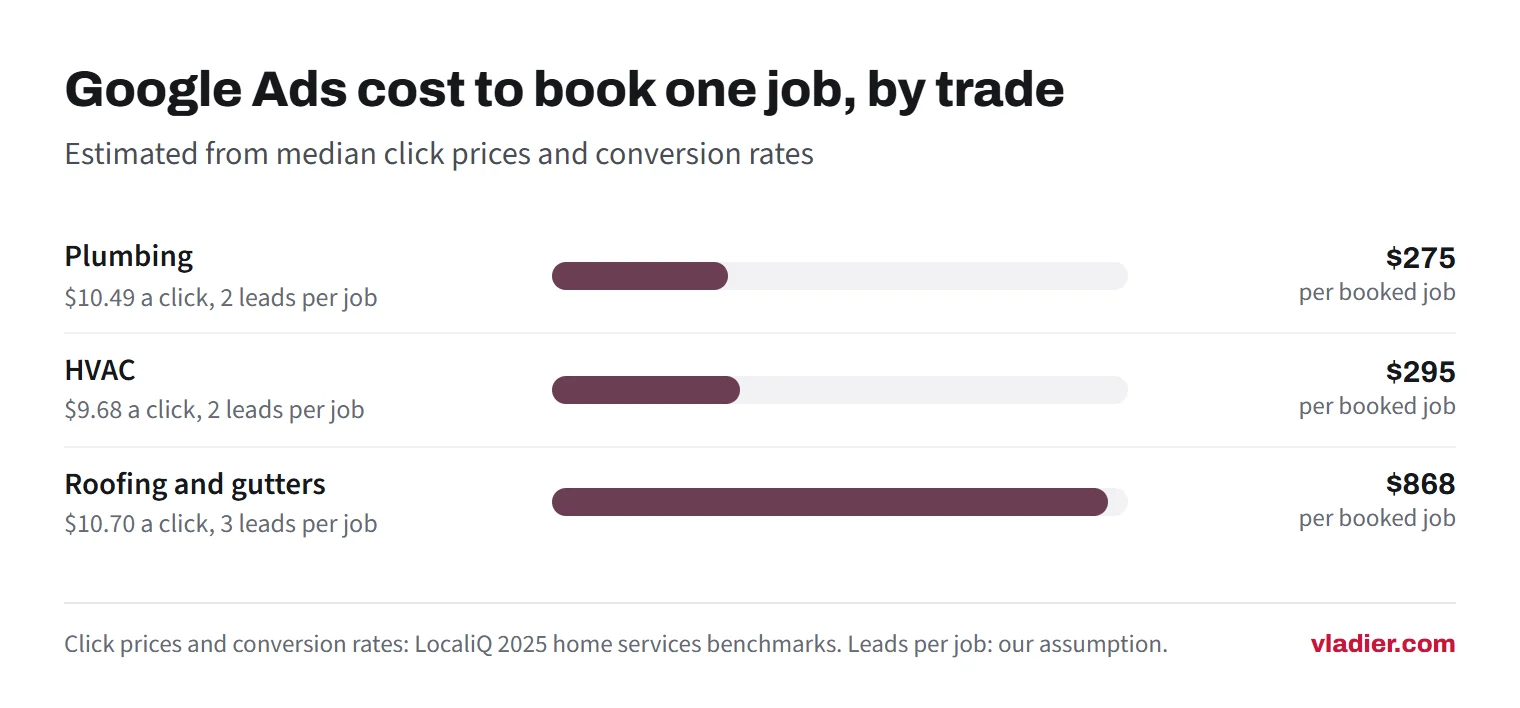
The last column is your break-even line. A job has to leave more profit than that, or the ad lost money on it.
One caution on the math. LocaliQ also reports median cost per lead directly: $129.02 for plumbing, $127.74 for AC installation and repair, and $228.15 for roofing. Those are lower than our calculated figures, because the median click price and the median conversion rate don't come from the same campaign. Treat our column as a careful estimate and LocaliQ's as the optimistic one.
Costs haven't come down since. In LocaliQ's 2026 report, the median click for the wider Home & Home Improvement category was $8.33, above the $7.85 home services median in the 2025 report.
Google Ads for plumbers, HVAC and roofers: what the math says
Now set the cost per booked job against what different jobs leave you. The profit figures below are made-up examples to show the comparison, not averages for any trade. Use your own.
| Job | Profit per job (example) | Cost per booked job | Result per job |
|---|---|---|---|
| Plumbing: drain clearing | $150 | $275 | Loses $125 |
| Plumbing: water heater replacement | $600 | $275 | Makes $325 |
| HVAC: AC repair call | $200 | $295 | Loses $95 |
| HVAC: system replacement, 1 in 4 leads booked | $2,000 | $590 | Makes $1,410 |
| Roofing: leak repair | $400 | $868 | Loses $468 |
| Roofing: full replacement | $3,000 | $868 | Makes $2,132 |
In all three trades, small repair jobs rarely pay for themselves from paid clicks, and bigger jobs can. Point the ads at the work that clears your line and leave the small jobs to your free listing and referrals.
Each trade bends the math differently:
Plumbing is mostly urgent. Someone with water on the floor calls the first business that looks real. So a fast answer does more for your cost per booked job than a cheaper click. In the example, the water heater clears the line and the drain call doesn't, unless that customer comes back for bigger work.
HVAC runs on the weather. In a heat wave, a small shop can be booked out before the ads finish spending, so the extra calls have nowhere to go. The repair call may lose money on day one and still be worth it if the customer later buys a replacement or a maintenance plan. That's a bet on repeat work, so count it only if you can see it in your own records.
Roofing has the lowest conversion rate of the three in LocaliQ's data, and homeowners often compare quotes. Repairs are hard to make pay. Replacements can, but only if you can live with a long gap between the click and the signed contract.
When Google Ads is the wrong move
Wait on Google Ads if any of these apply. They are our own rules of thumb, and each one breaks the math above.
- You can't tell which calls came from the ad. Without call tracking you won't know your clicks per lead or your cost per booked job, so you can't tell a working campaign from a leaking one. Set up tracking first (see the checklist below) or don't start.
- You have no room for more work. If you're booked two or three weeks out, every paid call is one you turn away or push back. Pause, or never start, until you have open slots.
- Nobody answers during the day. A paid click that reaches voicemail is usually a lost job. Sort out the phone first. Our guide on after-hours answering compares the options.
- You have few or no reviews. A homeowner who clicks your ad will often check your reviews before calling. With none, more of your paid clicks leave without calling, and your clicks per lead climbs. Our guide to getting more Google reviews is the cheaper fix.
- Your average job is small. If your typical profit per job sits under your cost per booked job, better ads won't close the gap.
- The website fails on a phone. If the number isn't tappable in the first screen, you're paying for clicks that can't turn into calls. Our website call button guide shows what to fix.
Google Ads or Local Services Ads?
Google Ads search campaigns charge per click. Local Services Ads charge per lead, which makes them easier to compare against your break-even number, but they need Google's screening and verification first. Our guide to Google Local Services Ads covers how they charge, who qualifies, and Google's 2026 move of Local Services Ads into Google Ads.
The formula works for both. With Local Services Ads you skip the clicks column and start from cost per lead. Run it on both, then test one at a time, so you know which one produced the jobs.
The minimum setup before the first dollar
We checked each item below against Google Ads Help on September 17, 2026. These are the settings that decide whether your budget buys calls from your service area or clicks from everywhere else.
- Add a call asset with the right number. Call assets put your phone number on the ad. On mobile it shows as a call button, and a call costs the same as a click on the headline. Google disapproves the number as unverified unless two things are true. It has to be written in the international format, which for a U.S. number means +1 and ten digits with no spaces. And that exact number has to appear in your website's code, or your domain has to be verified in Search Console.
- Schedule the call asset for the hours you answer. Google lets you show call assets only on certain days and hours, for example only when your business is answering calls.
- Turn on call reporting and track calls as conversions. With call reporting on, Google counts calls from your ads under a conversion action called "Calls from ads". It needs a call asset or a location asset with a verified phone number. You set a minimum call length, so short hang-ups don't count as leads. To track people who click through and then call the number on your website, you need the Google tag and a call snippet on the site.
- Set your location to Presence if you only work locally. Google's default is "Presence or interest," which also reaches people who have only shown interest in your area. "Presence" limits the ads to people in or regularly in the places you target. For a plumber who drives to the house, we'd pick Presence and draw the map around the towns you actually serve.
- Decide on search partners. When you create a Search campaign, search partners are included by default. Those are sites outside Google's own results. Leave them off until your own numbers show they bring calls.
- Add negative keywords on day one. They stop your ad from showing for searches you don't want, like jobs, training, DIY or parts. Negative keywords don't cover synonyms or singular and plural versions, so add those yourself. They do cover misspellings. Start with: jobs, salary, training, school, how to, DIY, parts, free.
- Know what the budget really means. Google can spend up to two times your average daily budget on a given day, and bills up to 30.4 times that daily figure in a month. Set $20 a day and a month can come to about $608.
Then read the search terms report once a week and add the searches that wasted money to your negative keywords. Do it every week, or clicks per lead tends to creep up.
How to test without burning the budget
Our suggestion for a 1 to 10 person shop, not a benchmark. Pick one service that clears your break-even line, like water heaters, system replacements or full roofs, and run ads only for that. Target the towns you actually drive to. Set a budget you could lose without trouble, and a stop rule before you start.
A simple stop rule: after enough spend to buy about three booked jobs at your break-even cost, count the jobs. For a plumber at $275 per booked job, that's roughly $825. Zero or one booked job means stop and look at the calls, the website and the search terms before you spend more. Two or three means keep going and keep counting.
Next step: take last month's calls and write down how many became jobs, and what those jobs left after costs. Put those two numbers into the table above next to your trade's click cost. If the result is a loss, put this month's money into reviews and your website first.
Frequently asked questions
How much do Google Ads cost for plumbers?
Are Google Ads worth it for a small contractor?
What is the minimum setup for a contractor Google Ads campaign?
Should I run Google Ads or Local Services Ads first?
Sources we checked (9)
- LocaliQ: 2025 Search Ad Benchmarks for Home Services (3,211 U.S. campaigns, April 2024 to March 2025)
- LocaliQ and WordStream: Search Advertising Benchmarks for Every Industry (2026 data)
- Google Ads Help: About call assets
- Google Ads Help: About advanced location options
- Google Ads Help: About negative keywords
- Google Ads Help: About phone call conversion tracking
- Google Ads Help: Measure calls from ads
- Google Ads Help: About the Google Search Network
- Google Ads Help: About average daily budgets
Want to see a new site before you decide anything?
We'll build your website for free and send you a private link. If you like it, plans start at $99/month. If not, you owe nothing.
Build my free website