Once your Google Business Profile is done, Bing Places is the next listing to set up. If your Google profile is already verified, the import takes a few minutes of clicking, and Bing verifies the listing for you. Apple is harder. Apple Business Connect is now called Apple Business. Apple's own help pages describe a Maps listing as a physical place that customers can visit. Do you work out of your truck and hide your home address on Google? Then you may not fit Apple's rules at all, whatever other guides say. We checked every step below on Apple's and Microsoft's help pages on September 17, 2026.
Why bother with Apple and Bing at all
Start with Google: work through the Google Business Profile checklist first. These two listings come after that, and they reach the phones and assistants that don't use Google Maps.
Apple Maps comes built into every iPhone. Apple says your place card appears in many Apple apps, "from Maps to Siri to Calendar, Messages, and Spotlight searches". Its Maps help page sends business owners to Apple Business to show up in Apple Maps, Wallet, Siri and more.
Fewer people search on Bing, but Bing results feed more than Bing.com. Microsoft says Copilot Search is grounded on Bing search results, so an accurate Bing listing gives Copilot the right phone number and hours to find.
What about ChatGPT? OpenAI's help page says ChatGPT search sometimes works with other search providers. It may also share your general location with third parties that supply nearby business listings. It links to Microsoft's privacy statement as one of those providers. It doesn't say where local business listings come from, and it doesn't mention Bing Places. So treat "Bing Places gets you into ChatGPT" as unconfirmed, unlike the Copilot link, which Microsoft states in writing.
Apple Business Connect is now Apple Business
If you search for Apple Business Connect today, you land on a product with a different name. Apple announced Apple Business on March 24, 2026, and launched it on April 14. It combines Business Connect, Business Essentials and Business Manager into one account. Apple calls it a free service. Paid add-ons like extra iCloud storage and AppleCare+ for Business are optional.
Existing Business Connect accounts moved over on their own. Apple says claimed locations, place card details, photos and account details migrated automatically at launch. If you claimed your listing before April, sign in at business.apple.com and it should be there.
Apple also said local ads in Maps search would arrive in the U.S. and Canada in summer 2026, clearly marked as ads. You don't need them to have a place card. The listing itself costs nothing.
The rule most guides get wrong: Apple and businesses without a storefront
Plenty of articles say a plumber or landscaper can list a service area on Apple Maps and hide their home address. We couldn't find that anywhere in Apple's documentation. Here's what Apple's own pages say, as of September 17, 2026:
- Apple's introduction to the product says: "If you have physical business locations, you can easily personalize your place card on Maps".
- The location settings page defines the address as "the address of your location where customers can get goods or services during open hours." It has to be the address customers use to travel to or find you.
- The map pin has to sit on top of your building, centered over the location.
- The same page covers name, address, hours, phone, website and categories. The words "service area" don't appear anywhere on it.
- Apple can change your listing's name, status or hours based on customer reports, and emails you when it does.
Apple Maps is built around places you can drive to. A roofer who runs jobs from a home office has no such place. A pin on your house would send every iPhone user who taps Directions to your driveway.
What to do depends on your setup. If you have a shop, showroom, yard or office where customers can actually walk in during business hours, add that location. If you work from home and don't want the address public, we'd skip Apple for now rather than publish your home address. If you're not sure whether you qualify, ask Apple Business support before you create anything. Neither choice changes your Google profile, where hiding the address is the rule for businesses that go to the customer.
How to set up Apple Business, step by step
This is Apple's current order, checked September 17, 2026. Do it on a computer. Apple's guide lists supported browsers, so use an up-to-date Safari, Chrome, Edge or Firefox.
- Search Apple Maps for your business first. If a place card already exists, you'll claim it later instead of creating a second one.
- Go to business.apple.com and select Sign up now. Enter your business name, website and address.
- Enter your first and last name, your country, a password and a phone number. Type in the codes Apple sends to your email and phone, then agree to the terms.
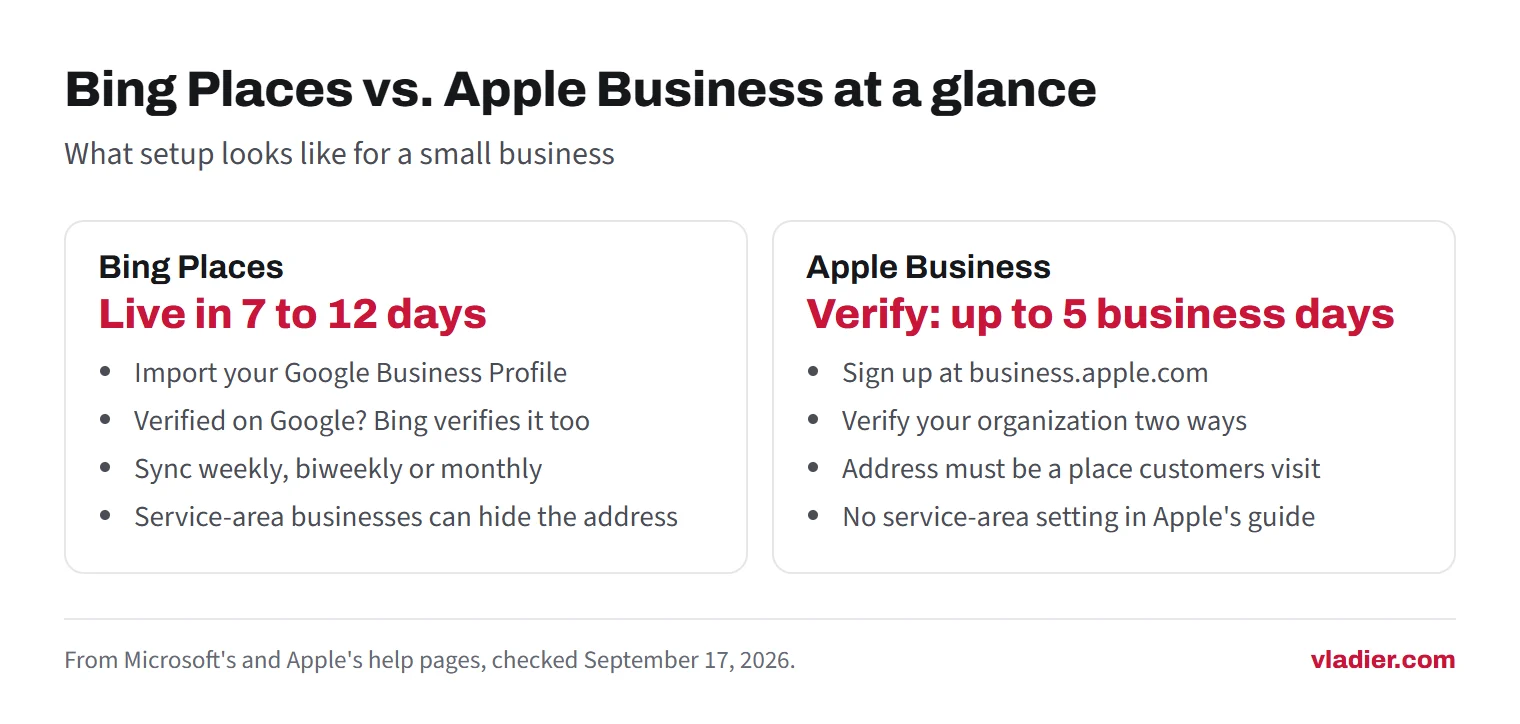
- Verify your organization. Apple requires two of these methods: a D-U-N-S number or EIN, a TXT record added to your domain's DNS, App Store Connect, or official documents such as a business license, sales tax permit, lease or utility bill. Apple says this can take up to five business days.
- Once you're in, go to Brands > Locations and select Add.
- Type your business name. If Apple finds your existing place card, select it to claim it. Otherwise choose to add a new location with that name.
- Set the address and drag the map marker onto your building if it's off.
- Fill in the display name, primary category, status, phone number and website, then your hours.
- Assign the location to a brand. For a one-location business, that's simply your company.
If the location is already managed by another organization, Apple tells you so and lets you request a transfer after you finish. A listing that already exists on Maps may also qualify for phone verification, using the number Apple has on file.
The domain option is easier if your website sits on a domain you control. You or whoever runs your DNS adds one text record. That's one more reason to own your domain rather than rent a name from a website builder. Business email on your own domain covers the same DNS panel.
Apple's rules for what goes on the place card
Apple's location settings page is stricter than Google's in a few places:
| Field | Apple's rule |
|---|---|
| Display name | Must match the name on your storefront or website. No descriptions, no ® or ™ symbols. |
| Address | The address listed on your website, where customers can get service during open hours. |
| Map pin | On top of the building, not on the road, sidewalk or parking lot entrance. |
| Phone | Include the country code. Extensions aren't supported. |
| Website | Your own site, ideally the page for that location. A Facebook, Instagram or TikTok page is allowed. A third-party website isn't. |
| Categories | Exactly one primary category, as specific as possible, plus up to 19 more. |
| Hours | Should match the hours on your website whenever possible. |
The website rule catches a lot of small businesses. If the address on your site doesn't match the one you give Apple, fix the site first.
How to set up Bing Places: the Google import
Bing Places now lives at bing.com/forbusiness. You can sign in with a Google, Facebook, Microsoft or work account. If your Google Business Profile is verified, importing it is the fastest route. These are Microsoft's current steps:
- Sign in to Bing Places, ideally with the same Google account that manages your Google Business Profile.
- In your account, select Import from your Google Business Profile.
- Choose how often to sync: weekly, biweekly or monthly.
- Sign in to Google and allow access.
- Import the listings Bing detects.
Bing imports the name, address, phone, hours, photos and other available details. If the business is already verified on Google, Bing verifies the imported listing automatically. Publishing then usually takes 7 to 12 days, and the dashboard may say Pending Publish for a while even after the listing is live.
Four catches with the Google sync
Microsoft lists these on its own help pages, so read them before you connect anything:
- You can't edit a synced listing in Bing. Microsoft says direct editing isn't available in the Bing Places dashboard for listings linked to a Google Business Profile. You update Google, then sync.
- Google overwrites Bing. If Bing matches your Google listing to an existing Bing listing, it uses the Google data to replace what's in Bing Places. Make sure Google is right first.
- Duplicates happen. You can't pick which listings get imported, and the sync can create a duplicate if your business is already on Bing. A listing marked Duplicate can't be edited, so you'd claim the published one instead.
- Categories may not match. Microsoft says some fields, including categories and Google UTM tags, may not sync exactly. Check the category on your live Bing listing after it publishes.
Turning the sync off later only stops future updates. It doesn't unlink the accounts.
Bing Places without the import
If you don't use Google, or you'd rather manage Bing by hand, create or claim the listing directly:
- Sign in to Bing Places and search for your business by country, name and location.
- If a listing exists and isn't claimed, claim it. If nothing turns up, select Create a new business.
- Enter the name, address, phone and category, plus your website and hours.
- Request a PIN to verify. Microsoft offers phone, mail, email or text, though not every option is available to everyone. Phone only works if the listing already has your business number and nobody edited it.
- Enter the six-digit PIN. A postcard usually arrives in 5 to 6 business days in the U.S., and Microsoft suggests waiting 12 days before contacting support.
Changes only go live after verification, and every edit restarts the 7 to 12 day publishing clock. Make your changes in one sitting, then leave it alone until they show up on Bing.
Bing and service-area businesses
Here Bing is clearer than Apple. Microsoft lists businesses without a physical store as a supported type. All businesses must give a valid address for verification, but service providers can hide it from search results. Its FAQ defines a service-area business with examples like a plumber or home repair business, and lets you add up to 20 service areas.
To hide the address, open your listing, select Edit, and scroll to the bottom of Basic details. There you'll see the question "Are customers expected to visit your address?" You can show the full address or only your city and ZIP code.
Two limits apply. You can't use a PO box. And a mailing address you don't actually operate from isn't allowed, because the listing needs the address you really work from. Your address stays on file with Microsoft even when it's hidden.
What to fix before you publish either listing
Both companies pull in data from other sources and compare it with what you enter. Bing says it merges your details with data from other sources. Apple wants your address and hours to match what your website shows. When the details disagree, expect delays or edits you didn't make.
So before you start, make your name, phone number, hours and address (or city) match on your website, Google profile and Facebook page. Bing's naming rule matches Google's: no "best" or "cheap" in the name unless it's legally part of it.
Then check that the website link works. In our research on 1,000 trade business websites (September 2026), about 1 in 5 website addresses listed for these businesses in public map data led nowhere useful. The breakdown is in our State of American Trades Websites report. Every new listing copies that link to one more place.
Which one to do first
| Your situation | Bing Places | Apple Business |
|---|---|---|
| Verified Google profile, no storefront | Do it now with the import, address hidden | Skip unless Apple support confirms you qualify |
| Shop, showroom or office customers visit | Do it now | Do it after Bing, since Apple verification takes longer |
| No Google profile yet | Wait | Wait. Get on Google Maps first |
| Already claimed Business Connect before April 2026 | Do it now | Sign in and check that the details moved over |
Next step: sign in at bing.com/forbusiness with your Google account today and run the import. Put a reminder in your calendar for two weeks from now to check that the listing is live and the category is right.
Frequently asked questions
Is Apple Business Connect still available?
Can a service-area business with no storefront use Apple Business?
Does Bing Places cost anything?
Can I import my Google Business Profile into Bing Places?
Does a Bing Places listing show up in ChatGPT?
Sources we checked (17)
- Apple Support: Apple Business Connect is now Apple Business
- Apple Business User Guide: Intro to Apple Business
- Apple Newsroom: Introducing Apple Business, a new all-in-one platform for businesses of all sizes (March 24, 2026)
- Apple Business User Guide: Sign up and verify your organization
- Apple Business User Guide: Add a single location
- Apple Business User Guide: Configure location attributes
- Apple Business User Guide: Maintain location information accuracy
- Maps User Guide for Mac: Add or update your business information in Maps
- Bing Places for Business Help: Get started
- Bing Places for Business Help: Create your listing
- Bing Places for Business Help: Sync your Google Business Profile with Bing Places
- Bing Places for Business Help: Supported business types
- Bing Places for Business Help: Businesses without physical store
- Bing Places for Business Help: Data quality guidelines
- Bing Places for Business Help: Frequently asked questions
- Microsoft Bing: Copilot Search
- OpenAI Help Center: Searching the web with ChatGPT
Want to see a new site before you decide anything?
We'll build your website for free and send you a private link. If you like it, plans start at $99/month. If not, you owe nothing.
Build my free website