An address like office@rivera-plumbing.com costs from nothing to about $8.40 per person a month. Email hosting for a small business comes in two shapes. Free forwarding sends mail from your domain to the inbox you already read. A paid mailbox gives each person a real inbox on the domain you own. The price is the easy part. The harder part takes ten extra minutes: a few DNS records that prove the mail really came from you. Those records decide whether your quote reaches the inbox or the spam folder.
Why the address should sit on your domain
A homeowner reading three bids sees three addresses. Plenty of good electricians send quotes from a personal Gmail account and win the job anyway. The address still does one thing badly. It says nothing about which company sent the estimate, and the supply house reads it the same way the homeowner does.
The stronger reason is control. The domain is the asset you own and renew. Email on that domain travels with it. Switch web hosts, switch email providers, hand the phone over to your daughter when she takes over the scheduling, and customers keep writing to the same address.
An address owned by somebody else works the other way. Leave the cable company or the free service and the address stays behind. Every customer, supplier, insurance portal and Google account tied to it has to be changed, and some of that mail you will simply never see again.
It also keeps your name in front of people. Someone who reads office@rivera-plumbing.com already knows where to find your website. Our guide on what a contractor website needs covers where the address belongs on the site itself.
What business email costs for a small business
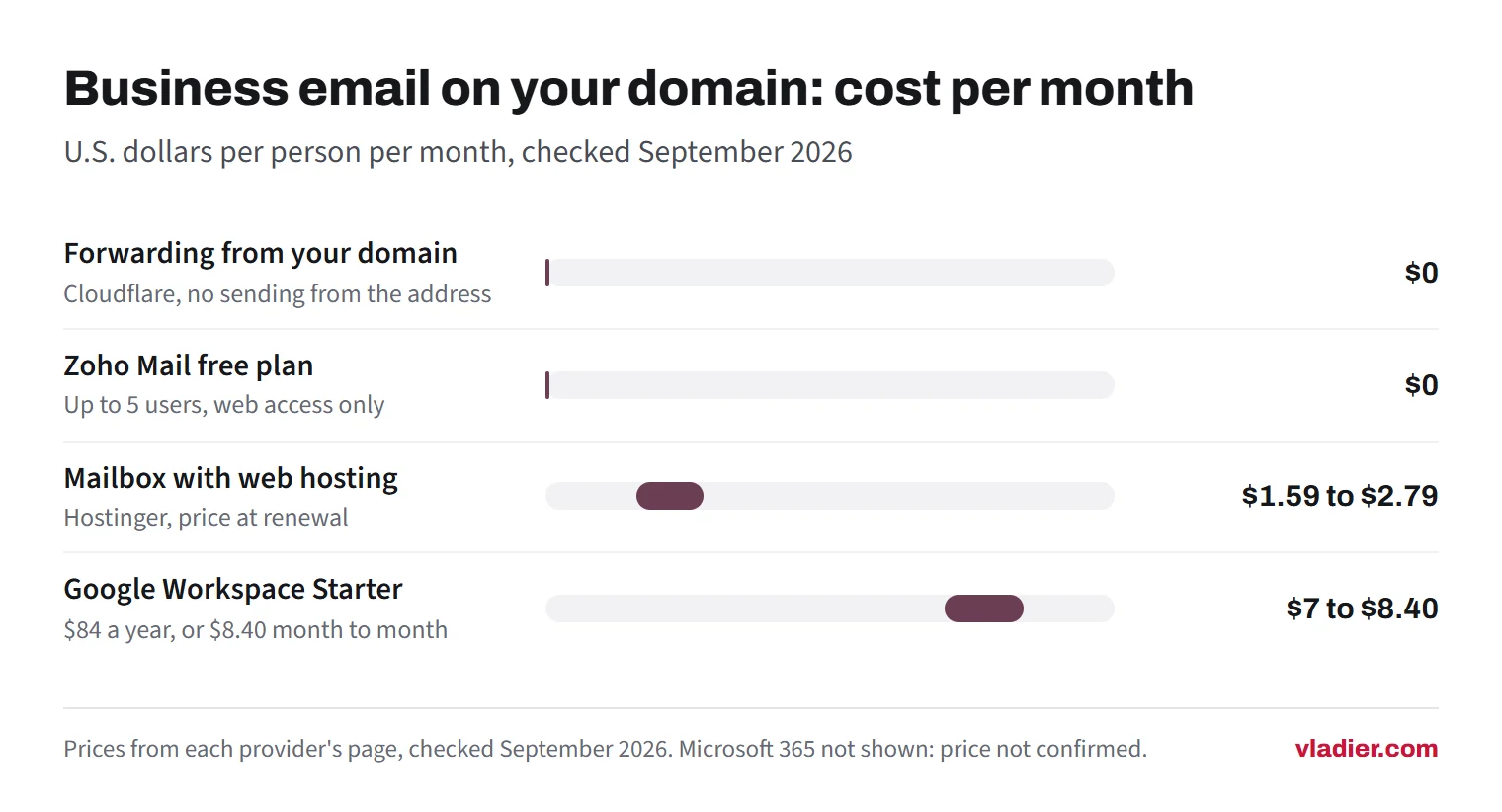
Prices below come from each company's own page and are in U.S. dollars, checked in September 2026. We list them as options and do not rank them, since the right one depends on how many people need an inbox. Two warnings before you compare. Some pricing pages show a different currency depending on where you load them, so confirm your own. And any price we could not confirm in dollars, we left out rather than guess.
| Option | What you get | Cost (checked September 2026) | Watch out for |
|---|---|---|---|
| Forwarding from your domain | Addresses like info@ or service@ that land in an inbox you already read | $0 on Cloudflare's free and paid plans | No mailbox of its own, and no sending from the address |
| Mailbox bundled with web hosting | A real mailbox on your domain, webmail and phone apps | Hostinger Starter: $0.39 a month on a 48-month term, renewing at $1.59, 5 GB. Standard: $0.99, renewing at $2.79, 20 GB | The low number needs four years prepaid. Compare the renewal, not the banner |
| Zoho Mail free plan | Custom email for one domain, up to 5 users, 5 GB each | $0 | Web access only on the free plan, so no Outlook or phone mail app over IMAP |
| Google Workspace (Gmail on your domain) | Gmail, Calendar, Drive, Meet and admin controls, with 30 GB pooled storage per person on Starter | Starter: $84 per user a year, or $8.40 per user month to month | Billed per person, so the price grows with the crew |
| Microsoft 365 Business | An Outlook mailbox on your domain, plus Microsoft apps depending on the plan | Microsoft's U.S. pricing page would not load from where we checked in September 2026, so read the price on microsoft.com before you compare | Plans differ mostly on whether the desktop Office apps are included |
Email is billed per person, and most hosting is billed per site. Our website hosting cost guide covers the hosting side, including the hosts that leave email out of the plan completely.
What free forwarding gives you, and what it doesn't
Forwarding is a rule you set on the domain. Mail sent to service@yourcompany.com gets passed to the inbox you already check. Cloudflare's Email Routing does this at no cost on free and paid plans and is built for exactly these addresses, support@, contact@, orders@. You get up to 200 destination addresses on an account, and inbound messages up to 25 MiB.
Forwarding does not let you answer as that address. Cloudflare's own documentation says Email Routing does not support sending or replying from your Cloudflare domain. Your reply goes out from whatever personal account received the mail, which is the moment the customer sees the address you were trying to hide.
The usual workaround is Gmail's send mail as feature. You add the address, click the link in the confirmation message, then give Gmail the SMTP server, username and password of the account that hosts it. That last step needs a provider with real SMTP behind the address, which plain forwarding does not give you.
Keep one date in mind. Gmail's help page says that starting January 2027, Gmail will stop supporting send as for third-party addresses such as @yahoo.com or @outlook.com. If your plan is to run the company address through a chain of free accounts, check whether that chain still works before the address goes on a truck.
Forwarded mail carries a delivery risk too. Passing a message along breaks part of the chain receivers check, and Cloudflare warns that restrictive DMARC policies can make forwarded email fail to deliver.
Forwarding is still a good answer for a one-person shop that wants info@ on the website and reads everything on one phone. Treat it as the free starting point, and move to a mailbox when you hire the second person or start sending quotes people have to trust.
MX, SPF, DKIM and DMARC, in plain words
These four records live in your domain's DNS settings. Skip them and your quotes go to spam, or somebody else sends invoices using your company name.
- MX records are the signpost for incoming mail. Google's setup page puts it simply. When someone sends you an email, the sender's computer looks up the MX records for your domain to see where to deliver it. Old MX records have to come off, because mail can break if incorrect ones stay.
- SPF is a TXT record that lists who is allowed to send mail using your domain. Google says SPF helps prevent your outgoing email from being marked as spam. Each domain gets one SPF record. It has to cover every service that sends on your behalf: the mail provider, the invoicing software, the quote form on your website.
- DKIM adds a signature to each message you send. The receiving server uses it to check that the message came from your domain and was not changed on the way. Your provider generates the key and you paste it into DNS.
- DMARC tells receivers what to do when a message claiming to be from your domain fails those checks. DMARC.org describes it as building on both DKIM and SPF, published as a DNS record that announces what an email receiver should do with non-aligned mail.
Receiving servers check all of this now. Gmail's sender guidelines require every sender to set up SPF or DKIM and use a TLS connection. Senders also need valid forward and reverse DNS records, and spam complaints below 0.3%. Anyone sending 5,000 messages a day or more needs SPF and DKIM and DMARC. A quote from a domain that authenticates nothing is exactly what those filters are told to doubt.
You will not have to write any code. Your email provider prints the exact records to paste, and your registrar has a DNS screen with a form for each one.
Setup checklist
This takes about half a morning, once. Do it in this order:
- Decide the addresses before you buy anything. One address everybody checks, like office@ or service@, plus a personal one for you, beats five mailboxes nobody opens.
- Buy one mailbox to start. Seats for people you have not hired yet are the easiest way to overpay.
- In your domain's DNS, delete the old MX records and add the ones your provider lists.
- Add the SPF TXT record, and include every service that sends mail as you.
- Turn DKIM on in the provider's admin panel and paste the key it gives you into DNS.
- Add a DMARC record. Start with a monitoring policy so you can read the reports before anything gets rejected.
- Wait before you panic. New MX records can take up to 72 hours to be recognized.
- Test it properly. Send to a Gmail address and to an Outlook address, and check the spam folder in both. Then reply from your phone and confirm the address on the reply is right.
- Change the address everywhere it appears: website, Google Business Profile, invoice template, truck lettering, voicemail greeting, supplier accounts, insurance portal.
- Put the domain renewal on auto-pay with a card you still use. If the domain lapses, the email stops with it, as our website maintenance cost guide explains.
Moving an address you already use, without losing mail
The fear here is a week of missing quotes while the change goes through. Doing the steps in this order avoids that.
Keep the old mailbox open and paid for the whole move. Nothing gets canceled until you have proof the new one works. Create the same address at the new provider first, then use its import tool to pull the old mail across before you touch DNS.
Only then switch the MX records. During the changeover, a message goes wherever the sender's lookup landed, and Google's page allows up to 72 hours for new records to be recognized. This is why the old mailbox stays alive.
For the next few weeks, open both. If the old provider offers forwarding, point the old mailbox at the new one so nothing sits unread. Cancel the old service after a full billing cycle with nothing new arriving in it.
One case has no clean fix. An address at an internet provider or a free service, like yourname@comcast.net, cannot be moved. You can only forward it and start telling people the new one. Set an auto-reply that names the new address, add a line to your signature for a couple of months, and update your suppliers by hand.
What to pick, by situation
Match the setup to the number of people who read email today. You can add seats the week you hire someone.
| Your situation | What we would set up | Rough monthly cost |
|---|---|---|
| One person, one phone | Forwarding from your domain into the inbox you already read, or one mailbox from your web host | $0 to about $2 |
| Two or three people in the field | A real mailbox each from a host plan, or Zoho's free plan if webmail is enough for the crew | $0 to about $9 total |
| Someone in the office handling quotes and scheduling | Google Workspace or Microsoft 365 for the office, because the shared calendar and files matter as much as the mail | About $7 to $8.40 per person |
| Everybody answers quote requests | One shared address, like quotes@, that reaches two or three people, plus a written rule about who replies first | Usually nothing on top of what you already pay |
A shared quotes address earns its keep in one specific way. You are on a roof, a request comes in, and somebody else answers it in ten minutes instead of four hours.
Start here this week
Pick the address you want on the website and the invoice. Set up forwarding today, free, so the address works at all. Then decide within the month whether the crew needs real mailboxes, and add SPF, DKIM and DMARC the same day you buy them.
Vladier does not sell email. When we build a site, we set the DNS records for whichever email provider you choose, so the two do not fight over your domain.
Frequently asked questions
Can I just keep using a Gmail address for my business?
Does every employee need a paid mailbox?
Will changing web hosts break my email?
Why do my quotes land in spam?
Sources we checked (12)
- Squarespace Help Center: Google Workspace pricing, billing, and invoices, U.S. dollar rates (checked September 2026)
- Google Workspace: Pricing and plan features (checked September 2026)
- Zoho Mail: Pricing, Forever Free plan limits (checked September 2026)
- Hostinger: Business email plans and renewal prices (checked September 2026)
- Cloudflare Docs: Email Routing overview
- Cloudflare Docs: Email Routing postmaster notes
- Cloudflare Docs: Email Routing limits
- Gmail Help: Send emails from a different address or alias
- Google Workspace Admin: Set up MX records for Google Workspace
- Google Workspace Admin: Set up SPF
- Gmail Help: Email sender guidelines
- DMARC.org: Overview
Want to see a new site before you decide anything?
We'll build your website for free and send you a private link. If you like it, plans start at $99/month. If not, you owe nothing.
Build my free website